


Ice Cream Shop Games for Kids
4.644.00 Reviews
App Specs
- Version
- 0.0.30
- Updated On
- License
- Free
- Downloads
- 10,000,000+
- Developer
- IDZ Digital Private Limited
- Categories
- Educational
- Platform
- Android, iOS
Screenshots



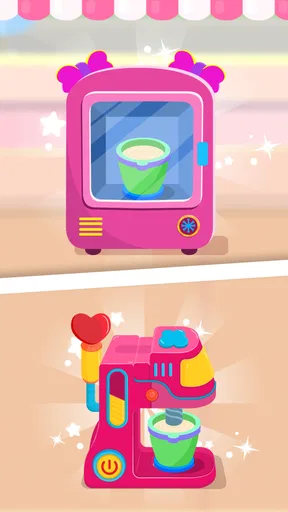




 Analysis by AppCompare
When I want a child’s screen time to feel a little more like pretend play than passive watching, an ice-cream shop game sounds like a cheerful choice. Ice Cream Shop Games for Kids is aimed at that kind of short, hands-on play: making treats, serving customers, and imagining what it might be like to run a tiny dessert counter. Its appeal is easy to understand, though whether it suits your family depends on how you feel about ads, optional purchases, and the game’s particular style of play.
What the free download means in practice
The game is free to download, which makes it easy to try without committing to a purchase first. There are in-app purchases priced from $2.49 to $3.99 per item, so “free” describes the starting point rather than a guarantee that every optional item is included. I’d let a child explore the free experience before deciding whether any paid extras are worthwhile. The game is rated Everyone, and it comes from IDZ Digital Private Limited.
That distinction matters if you’re choosing an app for a shared family device. A free download lowers the barrier to testing whether the theme and pace hold a child’s attention, while the listed purchase range gives you a clear heads-up that optional spending is part of the experience. I’d check the purchase settings on the device before handing it over, especially for a younger player who may tap through screens quickly. That is a general bit of sensible supervision, not a claim about how this game handles purchases.
What the play offers beyond the theme
The central idea is appealing because it gives children a playful role: they are not just looking at ice cream, but taking part in a make-believe shop routine. That can make a brief session feel more active than watching a cartoon. In educational terms, the game sits in the children’s learning-and-play space, but I’d treat any learning benefit as practice woven into play rather than a replacement for a structured lesson or an adult-led activity.
The game has an average rating of 4.3 from around eleven thousand ratings, and it has been installed over five million times. Those figures suggest that many people have tried it, but they don’t tell me whether a particular child will enjoy it or whether the app fits a family’s preferences. I’d use them as context, then make the decision based on the child’s age, tolerance for interruptions, and interest in pretend shop games.
Where it fits among children’s games
Compared with a basic coloring app, an ice-cream shop game gives a child a simple make-and-serve premise to follow. Compared with an open-ended sandbox, it offers a more guided theme. That structure can help a child who likes having a clear pretend role, but it may feel restrictive to someone who prefers drawing freely or inventing a story without prompts. If your main goal is spelling, number drills, or a carefully sequenced curriculum, I’d choose an app built around that specific learning purpose instead.
For a realistic everyday use, I can picture offering it during a short wait at a café or while dinner is finishing, with an adult nearby. The shop theme gives a child something recognizable to talk about afterward: what treat they made, what they would put on their own cone, or what it might be like to serve a customer. I wouldn’t rely on it as a long, uninterrupted activity, particularly if ads or purchase prompts are a concern in your household. A quick trial together is a better way to see how smoothly it fits into your routine.
Worth Reading Before You Choose

Baby Panda World Brings Quick Play to Modern Phones, but Its Game Library Feels Busy

ESPN’s Live Game View Makes Following Close Games Easier

QuizzLand Review: A Good Fit for Short Trivia Breaks, Not Every Player

Basketball Stars: Multiplayer Is Fast, but Can It Recover When Matches Go Wrong?

WEBTOON Turns Phone Updates Into a Better Reading Routine

Link to Windows Runs on Shared Habits, Not Social Feeds
Small trade-offs worth considering
One useful way to judge the game is to watch what a child does when the play pauses or becomes repetitive. If they enjoy returning to the same pretend-shop idea, the familiar theme may be a strength. If they quickly ask for a new kind of activity, a broader collection of mini-games or a creative app may offer better variety. This is a practical distinction: the game’s specific ice-cream premise is its hook, but also naturally narrows the kind of play it offers.
I’d also separate “educational” from “automatically educational for every child.” A make-believe shop can create an opening to talk about choices, colors, and simple everyday routines, especially if a grown-up joins in. A child playing alone may simply enjoy the theme. If you want to turn it into a small learning moment, ask them to describe their imaginary order or explain how they chose a treat, rather than expecting the app itself to teach a full lesson.
For parents deciding whether to allow optional purchases, a good approach is to agree on the boundary before play begins. You might say that the game is for trying the free experience today, or that any purchase needs an adult’s permission. This avoids making the decision in the middle of a child’s excited session. Since the app is free to start and paid items are listed separately, that conversation is more useful than assuming the download price covers every possible extra.
Getting Started with Your Sweet Adventure
As soon as you launch Ice Cream Shop Games for Kids, you're greeted with a vibrant and colorful interface that’s designed to captivate kids and adults alike. The app is super intuitive, which means you won’t need a manual to start whipping up delicious treats. The graphics are bright, cheerful, and perfectly suited for its target audience.
Once inside, you’ll find yourself behind the counter of your very own ice cream shop. Your mission, should you choose to accept it, is to serve up scoops and cones to a line of eager customers. The variety of flavors, toppings, and syrups available is impressive. Trust me, even as an adult, I found myself contemplating my own dream cone combination!
Gameplay and Features: Scoop, Serve, and Smile
The gameplay is straightforward yet surprisingly engaging. You start by selecting the type of cone or cup your customer desires, then it's on to the fun part—scooping the ice cream. With a plethora of flavors to choose from, each order is unique. But be quick! The customers are impatient and your ice cream scooping skills will be put to the test.
One feature I particularly enjoyed is the customization options available. You can upgrade your shop with new decor, unlocking more flavors and toppings as you progress. This adds a layer of strategy to the game, as you decide which upgrades will best serve your business goals. Plus, the sense of achievement when you unlock a new item is strangely satisfying.
For younger players, the app does an excellent job of incorporating educational elements. Kids can practice counting, color recognition, and basic time management skills as they work to fulfill orders efficiently. It's like sneaking veggies into a delicious smoothie—kids are learning without even realizing it.
The Joy of Progression
As you advance through levels, the challenges increase, keeping the game fresh and exciting. New customers with quirky personalities pop up, each with their own preferences and quirks. Some might test your patience, but it’s all part of the fun! The progression system is well-paced, offering just the right amount of challenge without becoming frustrating.
The app also includes mini-games and daily challenges, which are a delightful break from the regular gameplay. These extras provide opportunities to earn bonuses and rewards, keeping you motivated to return day after day.
A Few Scoops of Feedback
While the game offers a delightful experience, a few areas could use a sprinkle of improvement. Sometimes, the controls can feel a bit fiddly, especially on smaller devices. This might lead to a few accidental scoops or misplaced toppings—nothing a little practice can’t fix, though!
Also, while the ads aren’t overly intrusive, they can interrupt the flow of the game at times. A small price to pay for a free app, but something to be aware of if you’re handing the device over to a child.
Final Thoughts: A Sweet Treat for All Ages
Overall, this is a charming and engaging game that’s perfect for kids and a fun distraction for adults. Its combination of creativity, strategy, and light-hearted fun makes it a standout in the realm of children’s games. Whether you’re a kid at heart or simply looking for an app to keep the little ones entertained, it’s worth trying as a free download. Just remember to have a real ice cream cone nearby—it might just get you craving the real deal!
The game was released on July 25, 2024, and its current version is 0.0.30. It requires Android 6.0 or later. That makes it a possible fit for a range of Android devices, though I’d still check the device’s compatibility before planning a child’s play session. The store age rating is Everyone; as with any app for children, I’d make the choice based on your own family’s comfort with in-app ads and purchases as well as that rating.
Who is most likely to enjoy it?
I’d put this on the shortlist for a child who likes pretend food, making choices, and following a simple customer-serving routine. It can also suit a parent or caregiver looking for a themed activity to share: take turns choosing a cone, invent a flavor combination, and talk about what makes each order different. That shared approach can make a brief game feel more social without needing to turn it into a lesson.
It is less compelling for a child who wants a wide range of unrelated activities in one app, or who becomes upset when a screen session is interrupted. It may also be the wrong choice if you are specifically looking for a calm, ad-free experience or a structured educational course. In those cases, a coloring activity, a focused learning app, or an offline pretend-play set may suit the need better. The right alternative depends on what you want the screen time to do.
A low-pressure way to try it
For a first session, I’d sit with the child long enough to see whether the shop routine makes sense to them and whether the controls feel comfortable on your device. Let them explore without promising that every decoration or extra will be available for free. If the game holds their interest, you can decide later whether it deserves a place in the regular rotation. If they lose interest quickly, there is little reason to push it just because the theme looks appealing.
My overall verdict is that the game is easiest to recommend as a free-to-try, narrowly themed bit of children’s entertainment, not as a complete learning solution. Its strongest value is the imaginative shop setting and the chance to make playful choices; its trade-offs are the occasional interruption, possible fiddly controls on a smaller screen, and optional paid items. If those limits are acceptable and a child already enjoys ice-cream pretend play, I think it is worth a try. If your priority is uninterrupted play, broad creative freedom, or a specific curriculum, I’d choose a different kind of app.
Pros
- Engaging and colorful graphics.
- Simple controls for young children.
- Variety of ice cream flavors to create.
- Encourages creativity and imagination.
- No in-app purchases needed to progress.
Cons
- Limited replay value after completion.
- Background music can become repetitive.
- Ads may interrupt gameplay occasionally.
- Requires internet connection for updates.
- Some features may not be intuitive.
FAQs for Ice Cream Shop Games for Kids
What age group is Ice Cream Shop Games for Kids suitable for?
Ice Cream Shop Games for Kids is designed for children aged 3 to 8. It offers an engaging and interactive experience that helps develop creativity and motor skills. The colorful graphics and simple controls make it easy for young kids to navigate and enjoy without adult supervision.
Does Ice Cream Shop Games for Kids contain any in-app purchases?
Yes, Ice Cream Shop Games for Kids includes optional in-app purchases. These can enhance the gaming experience by unlocking additional features, characters, or items. Parents can control these purchases through their device’s settings to ensure a safe play environment for their children.
Will my child be exposed to ads while playing Ice Cream Shop Games for Kids?
The game does include ads, but they are carefully curated to be child-friendly. Parents can opt for an ad-free experience by making a one-time purchase. It's advisable to monitor gameplay to ensure that children are not inadvertently clicking on ads.
Is an internet connection required to play Ice Cream Shop Games for Kids?
No, an internet connection is not required to play Ice Cream Shop Games for Kids. The game can be enjoyed offline, making it a great option for travel or areas with limited internet access. However, downloading additional content or updates will require internet access.
What educational benefits does Ice Cream Shop Games for Kids offer?
Ice Cream Shop Games for Kids offers several educational benefits, including enhancing hand-eye coordination, promoting creativity through design activities, and introducing basic math concepts like counting and sorting. It's a fun way to combine learning with play, making it a beneficial tool for early childhood development.


